
Be careful — your tech is blind. It can’t see size, time, or reality, and it will still act like it can.
Some digital problems don’t come from bad design — they come from systems trying to interpret a world they can’t actually see. Windows attempted to guess physical screen size from pixel density, replacing a simple, reliable truth (“screen 1 / screen 2”) with a confident misunderstanding of reality. Technology is blind to physical size and physical time, and when it pretends otherwise, good ideas quietly become bad ones. This piece explores what happens when systems overreach, QA validates the idea instead of the impact, and humans are left navigating the gap.
There’s a particular kind of system failure that only happens when everyday users aren’t in the room. It’s the moment when a system insists it’s correct, even while contradicting what your eyes, hands, and physical reality are telling you.
Take Windows’ display settings.
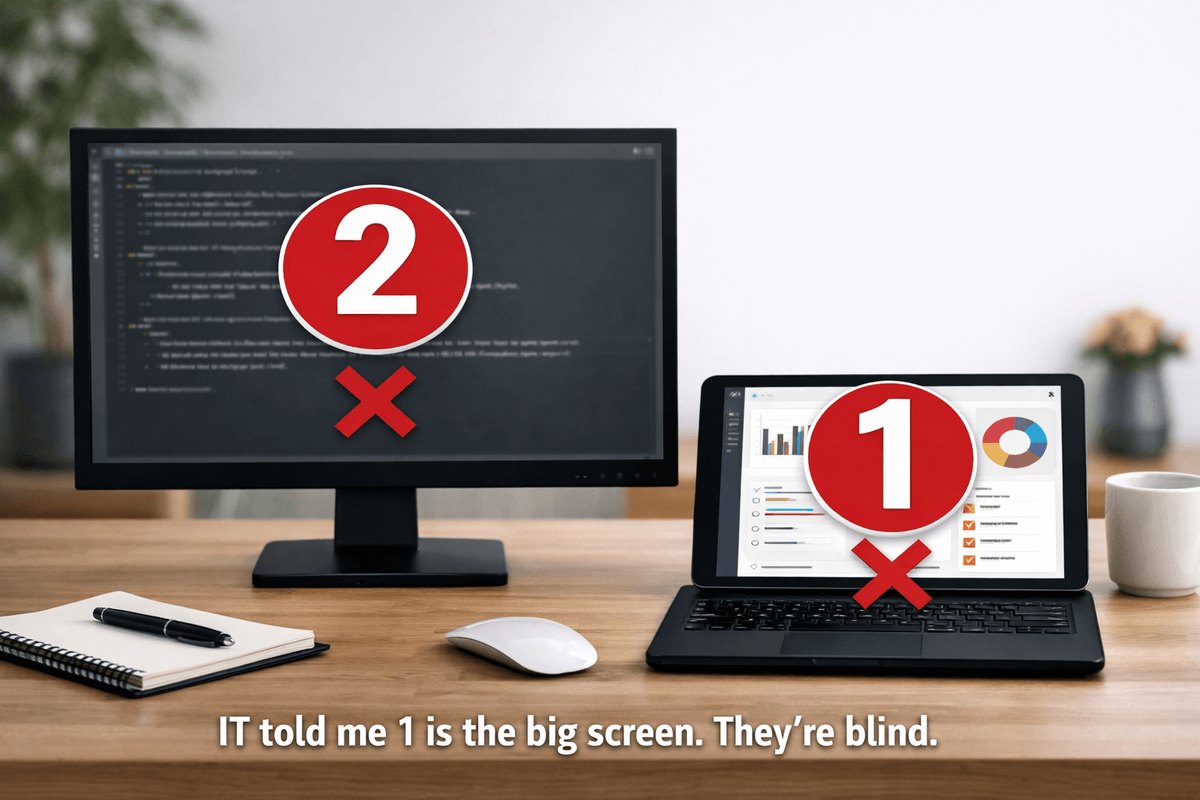
You can be sitting in front of a large external monitor and a small tablet screen, and Windows will confidently draw the small screen as the “big” one. Not because it’s malfunctioning — but because it’s using pixel density as its definition of size.
Technically correct.Humanly absurd.
It’s the digital equivalent of someone stretching their arms wide and saying:
“The fish was this big.”
1. When Machines Test Machines Instead of Humans
Automated testing passes because:
- the diagram renders
- the resolution maps correctly
- the event fires
- the workflow completes under ideal conditions
All green ticks.All technically correct.
Meanwhile, the human experience is:
- the big screen looks small
- the small screen looks big
- the layout resets every time the device wakes
- and the user is left trying to reconcile a diagram that contradicts the objects directly in front of them
This is what happens when machines validate themselves instead of validating reality.
2. The Physical Reality Problem: Tech Doesn’t Understand Size or Time
Digital systems don’t understand physical size.They understand:
- pixels
- scaling
- density
- internal coordinates
They don’t understand:
- the monitor that’s the size of your torso
- the tablet that’s the size of a paperback
So they guess.And sometimes the guess is so confidently wrong that it becomes comedy.
Digital systems also don’t understand physical time.They understand:
- timers
- countdowns
- state changes
They don’t understand:
- how long it takes to find a document
- how long it takes to switch devices
- how long it takes to take a screenshot
- how long it takes to type with actual fingers
This is how you get bank forms that time out before a human can physically complete the steps.
The system isn’t broken.It’s just not designed for humans.
3. When the Helpdesk Sees the System, Not the Reality
Remote assistance inherits the system’s blind spots.
The helpdesk can only see what the machine reports.They don’t see:
- the actual size of the screens
- the physical layout
- the timing of when devices wake
- the user juggling cables or switching inputs
So you get conversations like:
“Windows says the small screen is the big one.”“But I’m looking at it. It’s not.”
“Well… that’s how it’s designed.”
Both sides are right.Both sides are talking about different realities.
The system’s reality.And the human’s reality.
And only one of those is actually real.
4. When ‘Technically Correct’ Stops Making Sense Out Loud
There’s a moment in tech support that should make everyone pause.
It’s when the helpdesk finds themselves saying:
“Yes, you did exactly what the instructions said…but the system says you didn’t.”
At that point, the logic collapses the moment it’s spoken aloud.
Because what you’re really saying is:
- the system’s interpretation overrides the user’s actions
- the system’s internal model matters more than the user’s lived reality
- the system is unquestionable, even when it contradicts physical evidence
If you can’t explain the system’s behaviour without sounding illogical, the system is the problem — not the user.
5. The QA Question: How Did This Get Through?
Whenever you hit one of these exasperating failures, the natural question is:
How did this get through QA?
And the uncomfortable answer is usually:
QA was testing the system against the designer’s spec — not against human reality.
If the spec says:
- “Represent screen size based on pixel density”
- “Trigger timeout after X seconds”
- “Mark the workflow complete when the internal state changes”
…then QA will test exactly that.
And everything will pass.
Because QA isn’t testing:
- whether the diagram matches what a human physically sees
- whether a person can complete the task in the time allowed
- whether the system’s interpretation matches the user’s actions
- whether the logic makes sense when spoken aloud
QA is testing the designer’s imagination. Not the product.
Not the user.
Not reality.
This is how a system can pass every test and still fail every human.
When the Designer Isn’t Functionally Competent, Chaos Becomes the Default
Digital systems don’t invent their own logic.They inherit it.
If the designer:
- doesn’t understand the physical context
- doesn’t understand the user’s workflow
- doesn’t understand the constraints of the hardware
- doesn’t understand the limits of the technology
…then the system will be built on assumptions instead of reality.
And here’s the kicker:
Every other part of the process will treat those assumptions as truth.
QA will test them. Automation will validate them.
Support will defend them.
Users will be blamed for not fitting them.
This is how chaos becomes normalised.
Not because anyone is incompetent at their job —but because the first job, the design job, wasn’t grounded in functional reality.
And once the foundation is wrong, everything built on top of it becomes a house of cards.
6. The Exasperation Layer: When Everyone Is Right and Everything Is Wrong
These are the conversations that exhaust people — on both sides of the phone.
The user is right.The helpdesk is right.
The system is behaving exactly as designed.
And yet the conversation becomes exasperating because the design forces competent people to say ridiculous things.
This is the digital gap in action.
7. The Digital Gap: When Systems Believe Themselves Over Humans
The real digital divide isn’t about access to devices.It’s about the widening gap between:
what humans can physically see, do, and experience…and what digital systems think they see, do, and experience.
When the system believes its own model of reality more than the human who is actually living in it, the design has failed.
Not the user.Not the helpdesk.
The design.
8. The Closed Loop: AI Writing Job Applications for AI to Sort
This is the logical endpoint of systems that validate themselves instead of reality:
- AI writes the CV
- AI screens the CV
- AI optimises for AI
- humans become the error condition
It’s the same pattern as the screen diagram, just scaled up.
Machines testing machines.Machines validating machines.
Machines believing machines.
And humans standing on the outside saying:
“But that’s not what’s actually happening.”
If People Aren’t in the Room, the Design Won’t Be for People
When the big screen is really the little screen — and the system insists otherwise — it’s not a glitch.
It’s a reminder.
If everyday users aren’t in the room, the system won’t be designed for them. And if QA only tests the spec, the system will never be tested against reality.
This is the digital gap. And it’s widening.
Bridging the digital gap...